Skip to Main Content
Syracuse University Libraries

Altmetric Explorer

An introduction to what Altmetric Explorer is and how to use it.

Get to Know Altmetric Explorer

Access Altmetric Explorer:

About Altmetric Explorer

Altmetric Explorer is a valuable tool that helps SU researchers track how their publications and creative works are gaining attention online. Unlike traditional metrics which often rely on citation counts in academic journals, alternative metrics (altmetrics for short) provide a broader picture of impact by collecting data from freely available web sources. These sources include social media, news outlets, blogs, policy documents, online reference managers (like Mendeley), and more. Altmetric Explorer distinguishes between different types of links to ensure that all mentions of the same research output are connected.

Altmetrics can be useful in a number of ways:

  • Supporting tenure and promotion
  • Highlighting research in departmental newsletters
  • Demonstrating engagement for creative works or in newly published materials that may not have traditional citations.  

Altmetric Explorer and Dimensions are part of Digital Science. This means that Dimensions and Altmetric Explorer can be used together to enhance the data found in both databases. When searching for individuals or groups, it is optimal to start the search in Dimensions and then export the dataset to Altmetric Explorer. For more details on how to use Dimensions and Altmetric Explorer together, visit the following:

This video offers a brief overview of Altmetric Explorer:

For more information on altmetrics and ways to identify and track the impact of research and creative works, visit the following guide:

What Altmetric Explorer Tracks

Altmetric Explorer can be used to track:

  • Individuals
  • Publications
  • Groups -  and within groups, sort by:
    • Publications
    • People

Types of Content Tracked by Altmetric: 

Research Outputs:  

  • articles 
  • book chapters
  • books
  • clinical trial records
  • datasets

Scholarly Identifiers:

  • DOI 
  • ISBN
  • PMID
  • arXiv ID
  • URN

Attention Sources:

  • social media
  • news and blogs
  • policy and patents
  • academic sources

See the Data Sources box below for information about which publications, platforms, and other sources provide the content in Altmetric Explorer.

Data Sources

Altmetric Explorer tracks a variety of online data sources of research & creative outputs:

  • Policy Documents: policy, guidance, or guidelines document from a governmental or non-governmental organization.
  • Clinical Guidelines: documents that offer recommendations for clinicians and healthcare practitioners on how to manage and treat specific medical conditions or support decision-making in patient care.
  • Mainstream Media:  global news outlets
  • Blogs: academic and non-academic blogs. These are tracked automatically via RSS feeds.
  • Online Reference Managers
    • CiteULike (historical data from 2011-2014 only)
    • Mendeley (total number of readers, geographic locations (by country) of those readers, and the readers' self-identified subject areas and professional status)
  • Peer-Review Forums
    • Publons
    • PubPeer (historical mentions only)
  • Social Media
    • Bluesky (public posts and reposts only)
    • Facebook (posts on a curated list of public pages only)
    • Google+ (historical mentions from 2011-2019 only)
    • LinkedIn Groups (historical mentions from 2013-2014 only)
    • Pinterest (historical mentions from 2011-2013 only)
    • Reddit (original posts only, not comments)
    • X (public posts, posts and reposts only, no favorites)
  • Patent citations: global jurisdictions
  • Other online sources:
    • Wikipedia
    • Q&A Forums (Stack Exchange)
    • Faculty Opinions
    • YouTube
    • Open Syllabus (historical mentions up to 2015 only)
    • Citations from Dimensions
    • Citations from Web of Science (historical mentions from 2017-2024 only)

Altmetric Attention Score

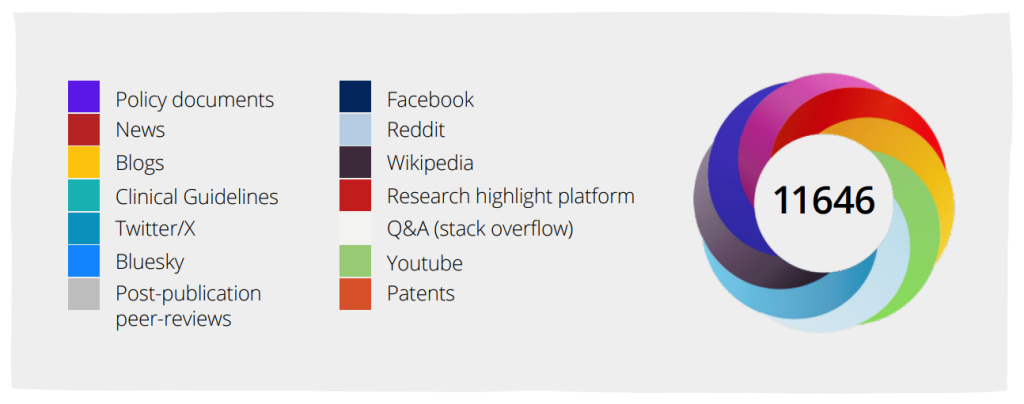
The attention data is visualized using a colorful badge called the Altmetric Attention Score (or "donut"), which represents both the quantity and quality of attention received. Each color in the badge indicates the source of the mention, such as red for news outlets, purple for policy documents, patents or clinical guidelines, and blue for posts on social media. The number in the middle is a weighted score, not a count of mentions.
Altmetric Details Page

Each research output in Altmetric Explorer has an Altmetric Details Page, which you can reach by clicking on the title of a research output.Altmetric Details Page

The screenshot above shows the "Altmetric Details Page" for the research output Observation of Gravitational Waves from a Binary Black Hole Merger, published in Physical review Letters in 2016. Among other details, the page shows that this research output is "in the top 5% of all research outputs scored by Altmetric" and that it is number 1 of all research outputs from Physical Review Letters.

An Altmetric Details Page highlights a research output's:

  • Title
  • Publication source (e.g., Physical Review Letters)
  • Publication date
  • DOI
  • Pubmed ID (if available)
  • Authors
  • Altmetric Attention Score
    • Includes links (divided by source type, such as "News," "Peer Reviews," and "Bluesky") to the specific posts, policy documents, etc. that mention the research output.
  • Attention Score in Context
    • Compares the attention received by the research output to:
      • All Research Outputs
      • Outputs from the specific publication source (e.g., Physical Review Letters)
      • Outputs of similar age
      • Outputs of similar age from the specific publication source
  • Timeline of attention
  • X demographics (number of X users who shared the research output)
  • Number of citations in Dimensions
  • Number of Mendeley readers
  • Number of CiteULike readers

Also included are links to view the research output:

  • In Dimensions
  • On Publisher site

There is also a link to receive an email alert about new mentions of the research output.